

When Wyebot presented four years ago at Mobility Field Day 8, I questioned the need for an overlay sensor network for your Wi-Fi network. I was a huge Juniper Mist customer and thought I had everything I needed from a built in scanning radio. Why do you need Wyebot in today’s modern Wi-Fi APs?

This reminds me of the question posed by the title of the book “Start with Why” by Simon Sinek. This book is one I highly recommend and has helped me in a lot of my daily work. Before you get to the How or What of a problem or project, you should be asking yourself WHY?
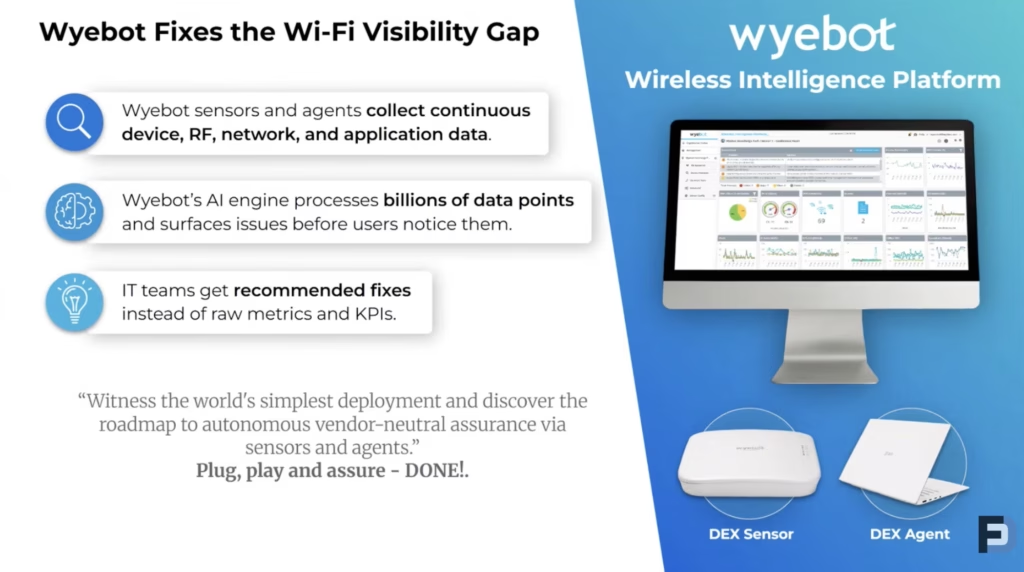
Fast forward to Mobility Field Day 14, Wyebot says their Sensors Fix the Wi-Fi Visibility Gap. What is the Wi-Fi Visibility Gap and why do I need to know about it?
I’m still asking the same question. But this time, Wyebot was kind to ship me a Wyebot DEX sensor so I could finally answer the question for myself.
Overlay networks are not a new technology. Some form of overlay Wi-Fi sensor has been around for years when people began realizing they needed some insight into the Wi-Fi that they couldn’t see or touch.
Back when I first looked at Wyebot, my first thoughts were that it does what I get with HPE Juniper Mist. I know what I’m looking for when designing my Wi-Fi networks; so, if I can design it appropriately and walk away, then I don’t need a Wyebot Sensor.
That lead me to question.. Who are Wyebot’s customers? What does Wyebot provide those customers?
I was debating this question when I got a tech support call from a family member..
Start with Wyebot
A close family member operates an Optometry office. They were having issues with their small office network. And as is always the case, the Wi-Fi gets blamed. I was traveling out there for the long holiday weekend so decided to bring my Wyebot sensor along for the ride.
The Wyebot sensor shines because it can be a passive sensor or can be an active sensor. The family member was kind enough to give me a network cable inside their network and the connection information for their Wi-Fi networks.
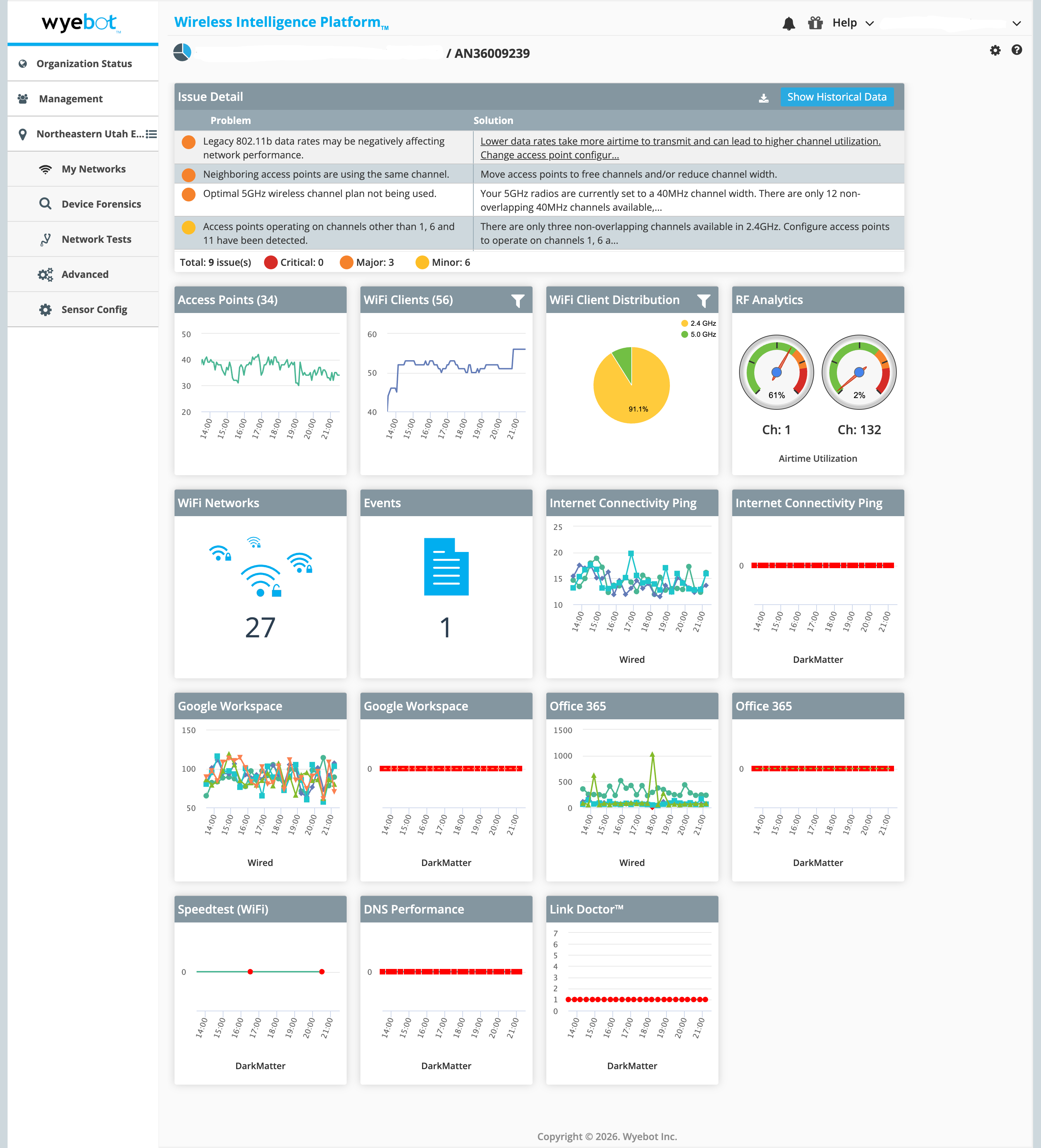
Ok now I know where Wyebot might fit, how does it help me?
Find Out Wyebot, Not Just Whatbot
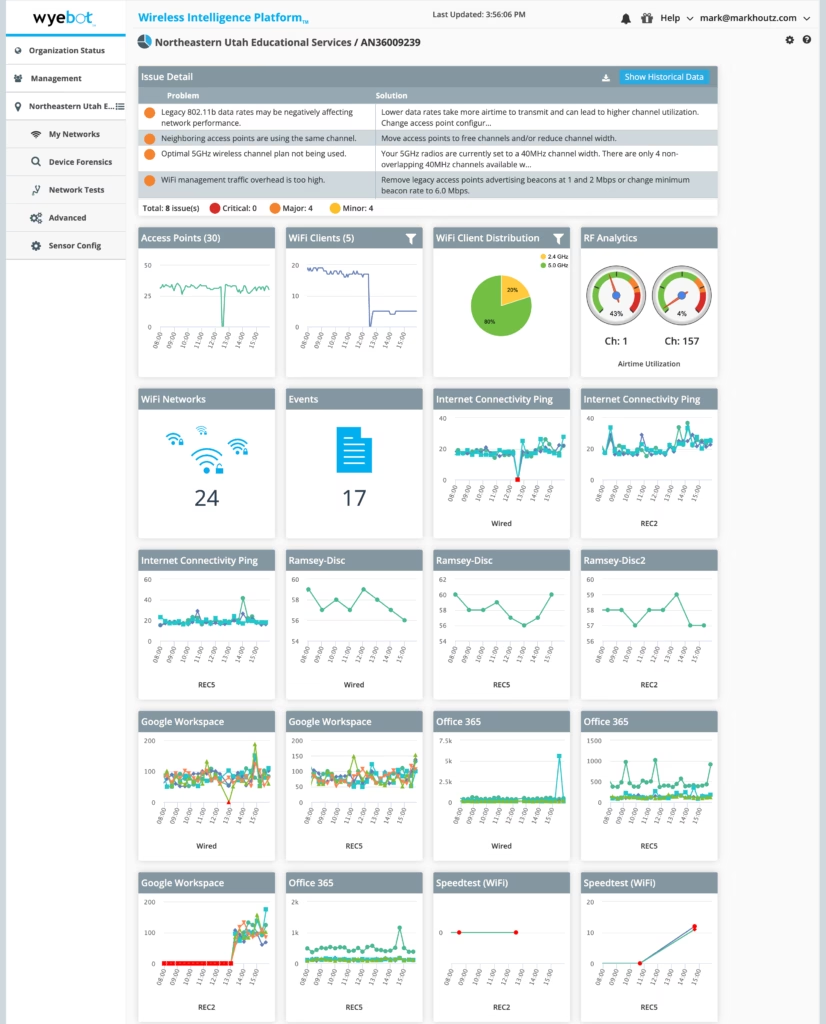
Wyebot gave me insights about several problems. There were three major issues and seven minor issues discovered using the Wyebot sensor. A seasoned Wi-Fi Engineer would discover these issues, Wyebot pointed them out quickly.
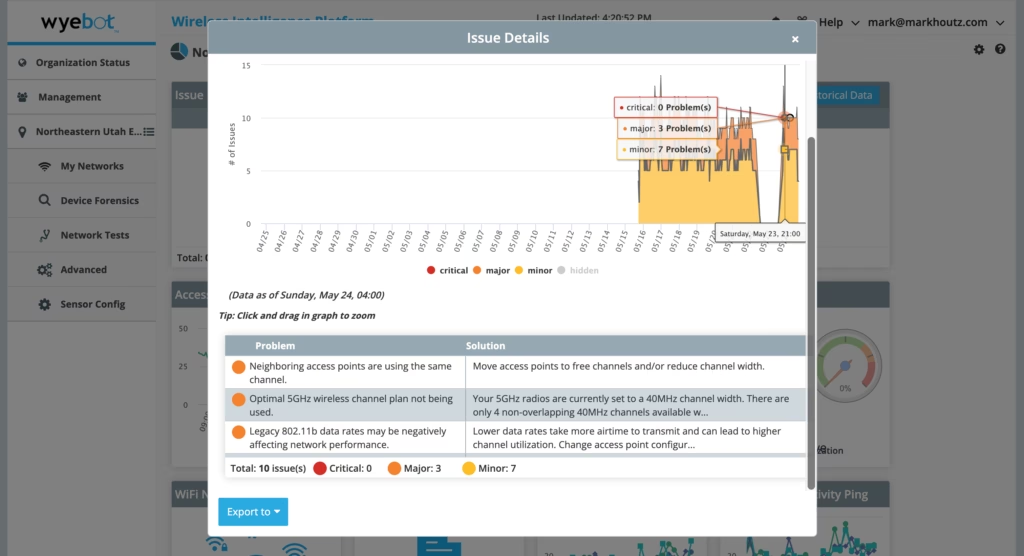
The Major Issues:
- Legacy 802.11b Data Rates are in use causing network performance issues. This is a standard issue where disabling B Rates can improve the performance for everyone. Default settings in Small/Medium networking equipment are usually left at defaults. I definitely consider this to a be a major issue.
- Neighboring APs are using the same channel in 2.4GHz as well as on 5GHz.. In 2.4GHz this is unavoidable except in the most remote locations. In 5GHz, this fits with being a bigger issue. Co-Channel Interference is bad.. to an extent but it’s part of how Wi-Fi works. Peter Mackenzie has been discussing this a lot recently, calling it Co-Channel Contention instead and being okay to live with it, if elimination is at the cost of RSSI, SNR, MCS, and other requirements for a Wi-Fi network to function properly.
- Optimal 5GHz Channel Plan is not in use. The site is not using any DFS channels. There are neighbor networks but it is less of an issue and would be questionable on being a Major issue. Yes they should utilize the DFS Channels but is that a Major issue if there isn’t tons of interference on the non-DFS channels? Also verify that clients can support the DFS channels. Being an Optometry Office maybe some of the machinery doesn’t support those channels.
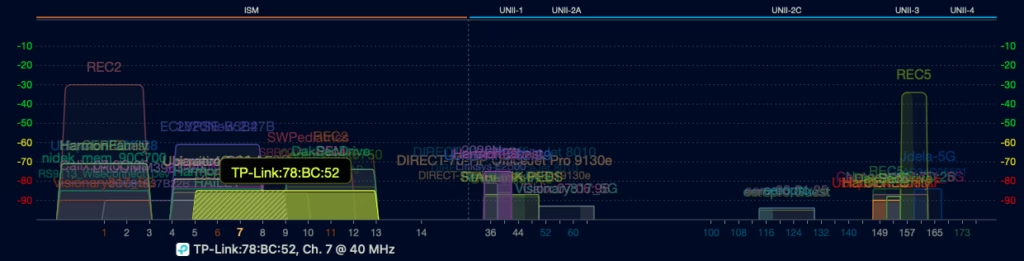
The Minor Issues:
- Uncommon wireless security type detected. The network is operating with TKIP enabled, limiting them to just 54mbps even though the APs are 802.11ac or Wi-Fi 5. Basically, they have great APs but are being held back because WPA/WPA2 is enabled on the SSID. I would consider this a Major issue instead of a Minor one, but Wyebot classified this as a minor issue.
- Wyebot showed that there is a Legacy 802.11a/b/g device on the network.. but we should still be able to disable the “b rates” because it supports “g”. This relates to the first major issue. Replace the device if possible, but that is not always possible. Disable the B Rates and this should continue working without any issues.
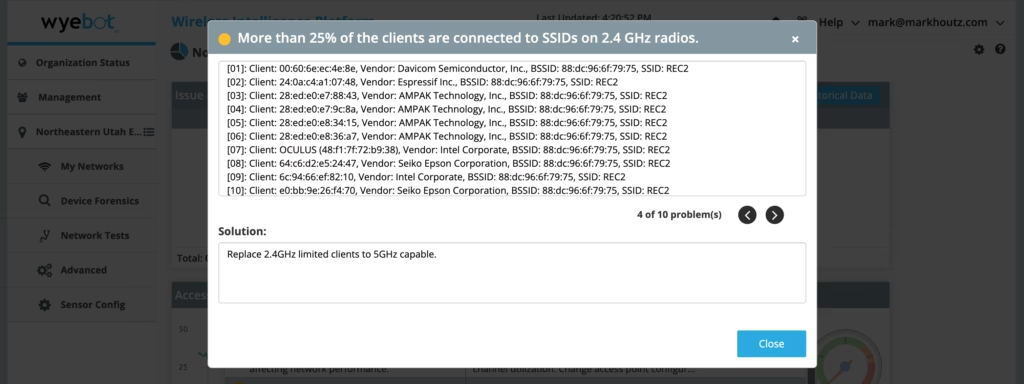
- More than 25% of clients are connected to 2.4GHz because the networks are divided out into a 2.4GHz SSID and a seperate 5GHz SSID. The site should check if devices connected to 2.4GHz can connect to 5GHz and move them if possible. This may require a network redesign, which I performed on site to add an additional AP to ensure 5GHz coverage everywhere. I’d also recommend looking at 6GHz APs in the future although most devices onsite do not support 6GHz.
- Significant difference in Power Levels between 2.4GHz and 5GHz radios. Since the design is using SSIDs to differentiate between 2.4GHz devices and 5GHz devices this one fits in the minor category. You could make a case to make this of higher importance but the design handles it correctly. The new design would help and I would decrease the power on the 2.4GHz radios to match 5GHz better.
- Access Points are operating on channels other than 1, 6, and 11. This one should be a major issue but not one we can do much about. All the APs controlled by the site were on proper 1, 6, and 11. The Wyebot notification didn’t say anything about an AP operating on a 40MHz wide channel in 2.4GHz. This should have a higher focus.
- Wi-Fi enabled Printers detected. These are adding Beacons to the air but unless the network is over congested, it’s a minor issues and fits here. I attempted to disable these from broadcasting but it turned out they are in a different office.
- High Wi-Fi client retransmission percentage in 2.4GHz. This is expected when a bunch of devices on 2.4GHz but can be difficult to avoid. This is why we want to move as many devices as possible to 5GHz or 6GHz. My recommendation is to the site is to move everything to 5GHz if they support it.
Understand the Wyebot Behind the Issues
From these finding is Wyebot worth it for even a small business site? If you know the reasoning behind these results then yes. The average small business user is going to not understand them, but may steer a small business owner to make the necessary changes and improve their Wi-Fi network.
Was it even the Wi-Fi causing problems at this site?
Once I had data about the site from Wyebot about the Wi-Fi network, I went to work to figure out the root cause. It turns out the issue was happening on hardwired phones and not the Wi-Fi devices.. that points to not being a Wi-Fi problem or we have multiple problems.
The other thing Wyebot can do is test the Wired side of the network and test applications. This is where I think Wyebot can really shine. Although the focus is on Wi-Fi testing, the network is more likely the source of issues.
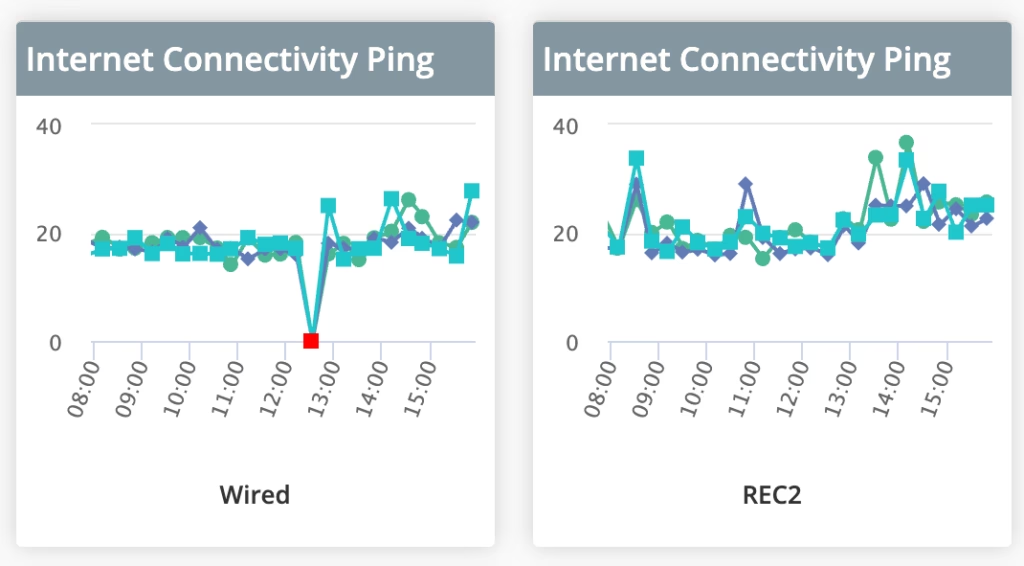
I created various tests including Ping, DNS, Speedtest, and Voice Tests. In the middle of the night, the Voice Test Failed a few times.. with an error Unable to establish connection with video server. So this is showing something more than the Wi-Fi being the issue.
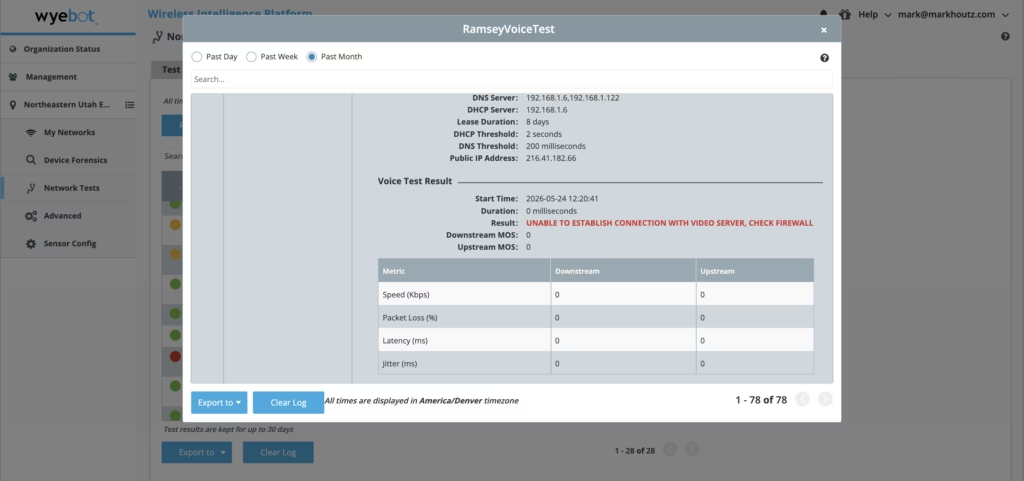
Wyebot said to check the firewall which is a step in the right direction but not the cause of the issue. This is useful as far as pointing out there was a connectivity problem.. but I still have no idea what was causing that.
Also, the sensor only tests at set intervals and if you’re dealing with an intermittent problem, every 20 minutes might not be often enough to capture any data about the problem. That forced me to dig into other tools that I had on hand.
Wyebot also has a client called the Dex Agent that you can install on Windows devices (sorry Mac and Linux users at the moment). I didn’t have access to this or else I would have tested it on the hardwired devices.
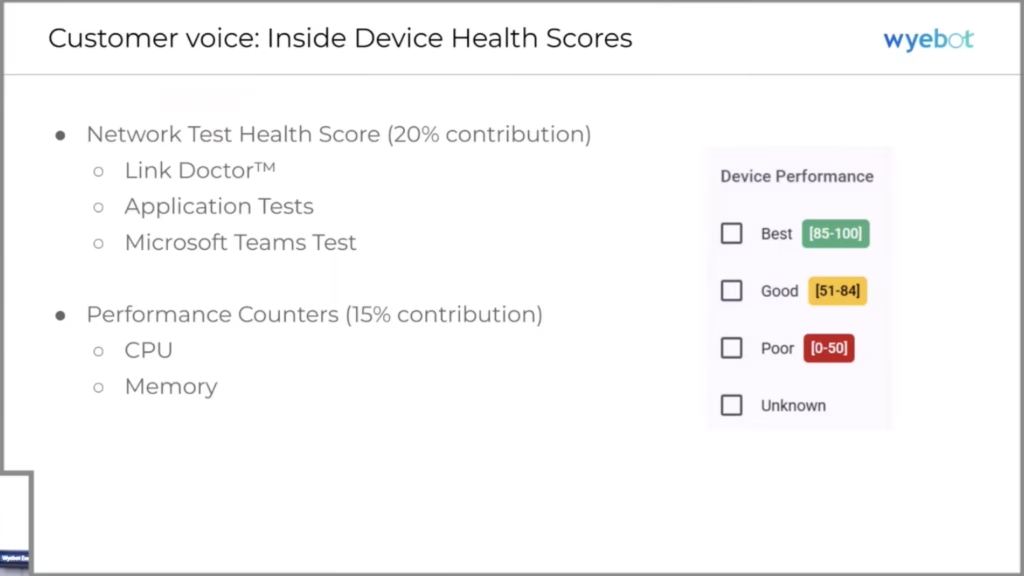
At MFD14, Wyebot said that using the Dex Agent allows you to use Teams Data as the canary in the coal mine. They said that Zoom doesn’t provide the data they need so they are not using Zoom. What about sites that are not Office 365 and Teams focused? Looking at just one vendor is a miss in my opinion.
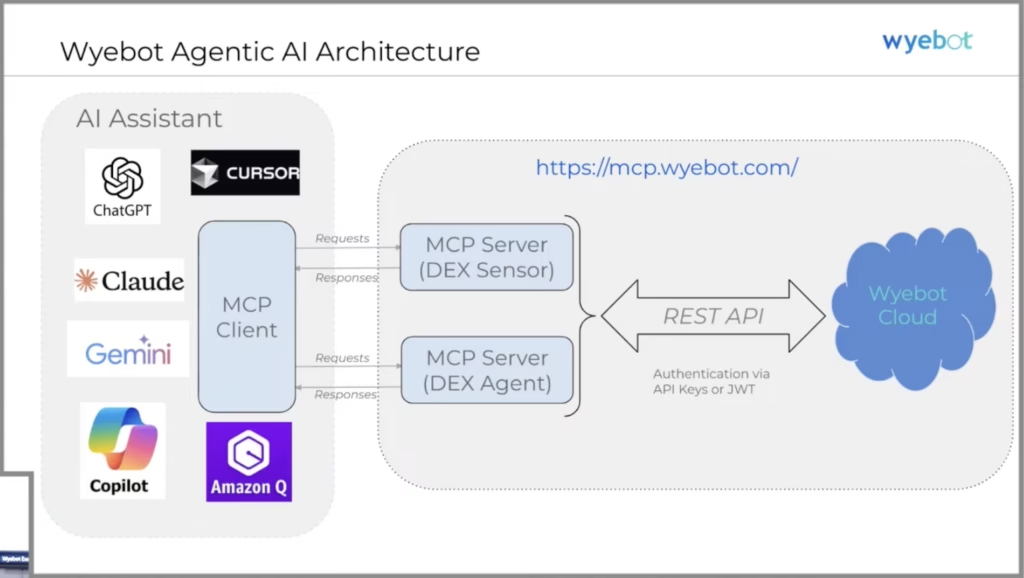
They also talked about how you can integrate the Wyebot data into an MCP Server for your own AI Inferencing.
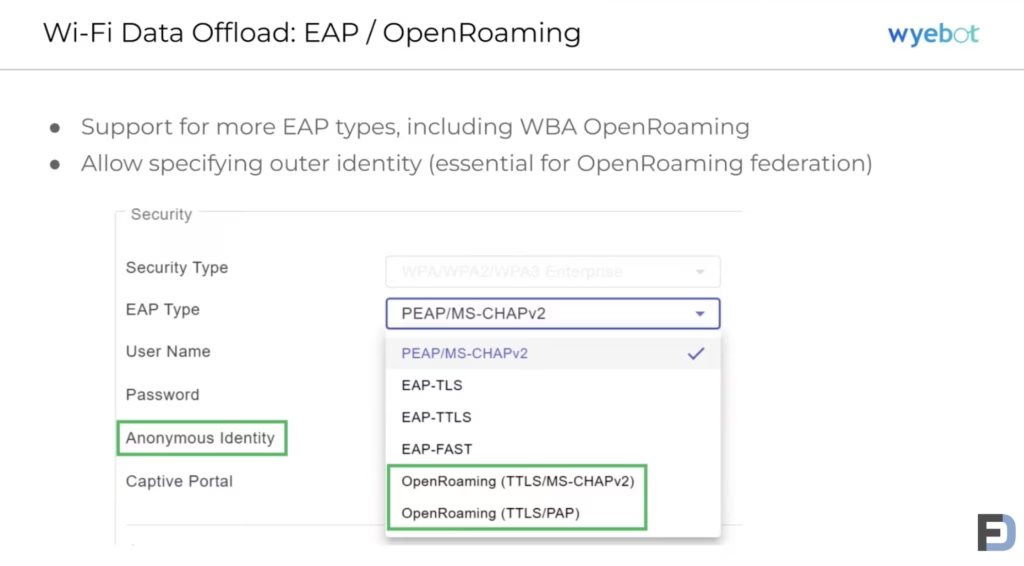
Wyebot’s biggest announcement at MFD14, though, was involving their ability to test any Wi-Fi security configuration against your network. Including eduroam and Passpoint networks.
For my family’s site, I eventually nailed it down to being an issue with the ISP’s Cable connection. They have a backup internet source over Fixed Wireless that doesn’t experience the problems when the primary Cable Internet was disconnected.
So What’s the Why of Wyebot?
So what did Wyebot do for me? I was able to quickly determine the issues with the Wi-Fi network and get to the core problem quicker. Was it a replacement for a good Wi-Fi Engineer? Not really, but it is something I could have shipped on site and gotten the data if needs be. That’s a key element.
I met with Wyebot after this session and discussed the findings of the sensor. I was told that their main purpose of the Wyebot sensor is to put it in place and not move it around. Having moved it around myself, I see a lot of value in being able to put them in a place where you are having issues. Otherwise, you have to build out a whole sensor network with all the cabling and switch ports, and POE requirements as your AP network. I’m glad that I could make this use case work, but I see Wyebot’s point of view. Capture the data all the time so you have it when you need it.
When it comes to the problems I discovered, it’s not like people are going in and changing their Wi-Fi setting all that often. I easily put the Wyebot in place for a few days, gathered the data I needed, and now know what to change. It would be useful to have it in place to verify once those changes are done but not entirely required, unless you don’t trust your Wi-Fi AP vendor’s settings or the person configuring things.
That brings me back to Why Wyebot? I see a need for an overlay network in some cases. If you have a vendor that has an extra scanning radio built in to the AP, then the need is lessened. There are benefits but are those enough to justify having an overlay network with all the added costs? That is up to the site or use case.
As for my plans for playing with the Wyebot sensors, I’m thinking I might move it around to see how it works to verify my configurations are working properly. If I ever have another site where someone says the Wi-Fi sucks, then I’ve got the sensor to prove it one way or the other. It really comes down to how much you trust your Wi-Fi Engineers. There may be a visibility gap but is that worth the cost? That’s up to you.